Extending your backend
You generated a standalone backend from a site. It is a normal repository and it import nothing from the CMS at runtime. This document say where your code go, what a regeneration rewrite, and what it refuse.
Short answer: src/owned/ is yours, forever. apps/site/src/owned/ and
apps/site/src/pages/owned/ are yours in the emitted site. package.json,
wrangler.jsonc, .nvmrc, .gitignore, README.md and your own workflows are
yours to keep. Everything else is rewritten from the model definitions on every
regeneration.
Source of the rule: backend/src/lib/graduate/zones.ts. The table below is
checked against that code by backend/test/extending-your-backend-doc.test.ts,
so this document cannot drift from the emitter.
What you own, what regeneration rewrite
Section titled “What you own, what regeneration rewrite”Generated backend have three kind of file. Rule decide zone from PATH alone — not from marker comment, not from list somebody maintain.
| Zone | Who own | What regeneration do |
|---|---|---|
generated |
emitter | rewrite every run |
owned |
developer | write once as scaffold, never touch again |
shared |
both | write when absent, never overwrite |
One exception, keyed: package.json — both root and apps/site/ — is MERGED,
not left alone. See “Manifest merge”.
Rule, exact. Site questions asked FIRST, because apps/site/package.json wear a
shared name the API also use and apps/site/src/owned/x do not start with
src/owned/:
- Path start with
apps/site/src/owned/orapps/site/src/pages/owned/= owned. - Path is
apps/site/package.json,apps/site/package-lock.json,apps/site/.npmrcorapps/site/wrangler.jsonc= shared. - Anything else under
apps/site/= generated. - Path start with
src/owned/= owned. - Path is
.github/workflows/dee-wan-build.ymlor.github/workflows/deploy-from-repository.yml= generated. Both are machine configuration; fix to them must reach adopted project. - Path is
package.json,package-lock.json,.npmrc,.nvmrc,wrangler.jsonc,.gitignore,README.md, or start with.github/= shared. - Everything else = generated.
Two path never scanned at all, so never fingerprinted and never staged:
src/serve.local.mjs and src/credential-digest.mjs. They are BUILD OUTPUT
that live in src/ because they keep generated Prisma client external. They are
in .gitignore — offering them to git add made whole push fail.
Edited generated file is REFUSED BY NAME on next regeneration, with place to move work to. Never silently overwritten. See “What is refused”.
Zone of each emitted path
Section titled “Zone of each emitted path”| Path | Zone |
|---|---|
prisma/schema.prisma |
generated |
graduation.manifest.json |
generated |
src/app.ts |
generated |
src/worker.ts |
generated |
src/security.ts |
generated |
src/owned/routes.ts |
owned |
src/serve-cli.ts |
generated |
migrations/0002_graduation_ledger.sql |
generated |
scripts/regenerate.mjs |
generated |
scripts/emit-migration.mjs |
generated |
scripts/file-manifest.mjs |
generated |
scripts/portable-client.mjs |
generated |
scripts/configure-deployment.mjs |
generated |
tsconfig.json |
generated |
wrangler.example.jsonc |
generated |
wrangler.build.jsonc |
generated |
scripts/load-snapshot.mjs |
generated |
data/published-snapshot.json |
generated |
.github/workflows/dee-wan-build.yml |
generated |
.github/workflows/deploy-from-repository.yml |
generated |
.github/workflows/anything-else.yml |
shared |
package.json |
shared |
package-lock.json |
shared |
.npmrc |
shared |
.nvmrc |
shared |
wrangler.jsonc |
shared |
.gitignore |
shared |
README.md |
shared |
apps/site/src/owned/config.mjs |
owned |
apps/site/src/pages/owned/thanks.astro |
owned |
apps/site/package.json |
shared |
apps/site/package-lock.json |
shared |
apps/site/.npmrc |
shared |
apps/site/wrangler.jsonc |
shared |
apps/site/src/lib/pages.json |
generated |
Add a custom route
Section titled “Add a custom route”src/owned/routes.ts is scaffold, written once, and it ship EMPTY on purpose.
Put your route there:
export function ownedRoutes(prisma: GuardedPrisma) {  const routes = new Hono()
  routes.post('/checkout', async (c) => {    const body = await c.req.json()    return c.json({ ok: true })  })
  return routes}
src/app.ts mount it with app.route('/api', ownedRoutes(deps.prisma)), LAST —
after every model router, so a path you choose can never shadow a generated one.
Your /checkout above serve at /api/checkout.
What you inherit: authentication run on app.use('*') before anything is
mounted, so every request that reach you is already identified or refused.
Inside a handler you have c.get('principal'), c.get('accessVariant') and
c.get('prisma'). The guarded client is PASSED IN rather than imported, so your
query run under the same extension the generated router do.
What you must not assume — the permission check ask which MODEL a request is
for, and it answer by PREFIX /api/<model>…:
- Path starting with a model’s name is permission-checked AS THAT MODEL.
/api/articles-reportmatch thearticlemodel, so caller need article permission to reach it — more or less than you intended. - Path matching no model resolve to no model. Session-based caller is then
governed by the operation alone (GET, POST…); read-token caller is refused
unless its scope is
*.
So pick first segment no model slug can take — /checkout, /webhooks/stripe,
/reports/daily. If a route need a rule of its own, enforce it in the handler.
Nothing there is checked for you.
Site route, not API route: add file under apps/site/src/pages/owned/. Astro
route exist by being file under src/pages, so an owned page cannot live in
apps/site/src/owned/. It serve under /owned/…, and the address resolver
refuse any generated page, chrome route or redirect that would shadow that URL
space.
Add business logic
Section titled “Add business logic”Same place, any file you like: whole src/owned/ tree is yours. Add
src/owned/pricing.ts, import it from src/owned/routes.ts. Put there:
- custom route,
- business logic,
- extra authentication beyond the emitted bearer check,
- integration with third-party system,
- your own table and its migration,
- anything that must survive regeneration.
Owned file is never fingerprinted — that IS the promise. Do not put your code in a generated file “just for now”: next regeneration refuse the whole run by that file’s name.
In the site, the typed extension seam are in apps/site/src/owned/:
Head.astro, BodyEnd.astro, the layout slots, the section
Wrapper/overrides, and config.mjs for Astro integration and the site
origin.
Add a dependency
Section titled “Add a dependency”Edit package.json and install through the verified installer:
node scripts/install-dependencies.mjsYour entries are kept — see “Manifest merge”. npm ci and npm install are not
the install path: the installer check npm against .nvmrc and packageManager,
extract with scripts off, audit the tree against exact allowScripts, then
npm rebuild only approved script.
Site dependency go in apps/site/package.json, installed with
node scripts/install-dependencies.mjs apps/site. A Svelte or React island also
need its pinned integration added to apps/site/src/owned/config.mjs.
Add a binding
Section titled “Add a binding”Edit wrangler.jsonc. It is shared: written when absent, never overwritten, so
your binding stay. wrangler.example.jsonc beside it is GENERATED — a template
with no account id, no route and no database id, because this generator do not
decide where you deploy. Copy from it; do not edit it.
wrangler.build.jsonc is generated too, and it is what npm run build bundle
with. wrangler.deploy.jsonc is written by the deployment
(npm run deploy:configure) and is gitignored.
Site binding go in apps/site/wrangler.jsonc, shared on the same terms.
Add your own CI
Section titled “Add your own CI”Add a workflow under .github/workflows/ with any name except
dee-wan-build.yml and deploy-from-repository.yml. .github/ is a shared
prefix, so your file is written by you and never touched. Those two names are
generated: they are machine configuration and a fix to them must reach your
project on the next regeneration.
What regeneration change
Section titled “What regeneration change”Regeneration rewrite every generated path from current model definitions:
schema, routes, worker entry, build scripts, emitted workflow, emitted site. It
append migration for schema change — never rewrite past migration.
It does NOT touch:
- anything under
src/owned/,apps/site/src/owned/orapps/site/src/pages/owned/, - shared file that already exist (
wrangler.jsonckeep your bindings), - migration already applied,
- your git history.
package.json is the one shared file it DOES change, and only by ADDING. See
“Manifest merge”.
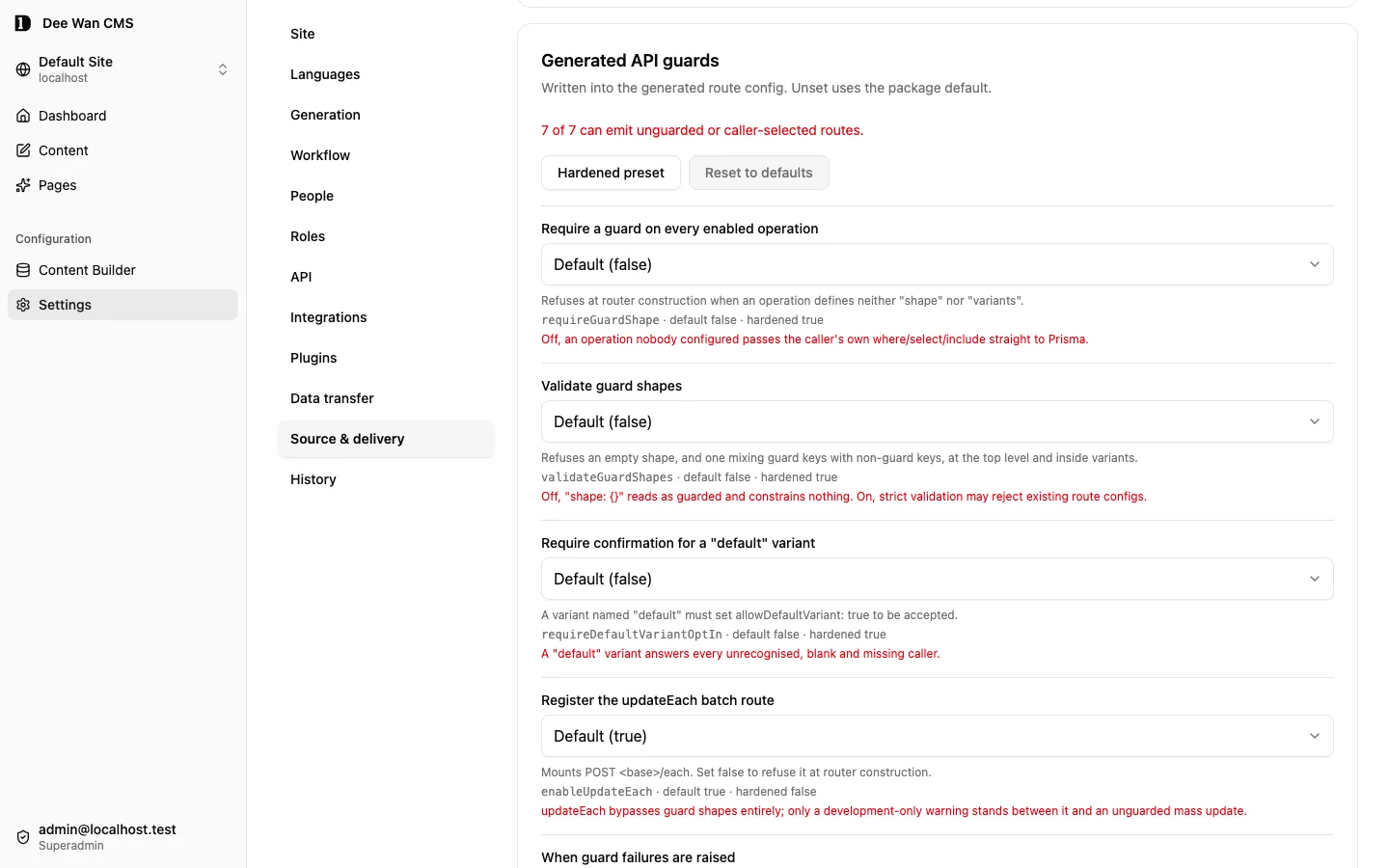
Guard options of generated routes come from Settings → Source & delivery → Generated API guards. Regeneration write them into generated route config; unset one use package default.
Sidecar .dee-wan-files.json hold fingerprint of every generated file as
emitter last wrote it. That is how “you edited this” is detected. Owned file
never fingerprinted — that IS the promise.
Regeneration run without the CMS. The generator is compiled into your repository
at graduation (scripts/dee-wan-generator.mjs), pinned by digest in
graduation.generator.json, and each emitted script verify the pin before it
import. npm run regenerate chain the schema, the app, the Prisma client and the
portability rewrite in that order.
What is refused, and how to move the work
Section titled “What is refused, and how to move the work”An edited generated file does not get overwritten and does not get adopted. The run stop and name the file:
- generated file whose bytes changed —
“
<path>is generated and has been edited. Move your change undersrc/owned/, then delete this file so it can be regenerated.” - file at a generated path that the previous manifest never recorded —
“
<path>is not in the previous manifest. If it is yours, move it undersrc/owned/and delete it from here.”
Moving the work: copy the change into a new file under src/owned/, import it
from src/owned/routes.ts, delete the edited file, regenerate. The emitter
rewrite the deleted file from definitions.
A file the emitter removed is deleted only when it is ours AND unmodified. Anything else is left where it is.
Content rows are the same contract one level down: generated content table
belong to the run, and a row written into one make the next run refuse
observed_row_set_mismatch. Your own table and your own rows survive — that is
what src/owned/ and your own migrations are for.
Published snapshot data/published-snapshot.json is GENERATED. Edit it and the
next regeneration refuse by name. The loader refuse it too: wrong site, wrong
artifact, changed byte, partial load, conflicting replay. Same byte twice = safe,
write nothing.
After detachment nothing regenerate anything, so every file — generated one included — is yours to edit. Before detachment, edited generated file is refused by exact path.
Manifest merge
Section titled “Manifest merge”Both package.json — root and apps/site/ — are shared but MERGED. Pure
“never overwrite” also mean “never add”, so day emitter start writing code that
import new package, already-adopted project regenerate into source npm ci
cannot resolve. Failure show up two step later as tsc --noEmit or
astro check naming a module, not naming missing dependency.
Merge rule, both file, same:
- blocks merged:
dependencies,devDependencies,overrides; - key your file already have: YOURS, value untouched, including version you deliberately move off the pin;
- key only template have: ADDED;
- nothing ever removed;
packageManageradded when absent, yours when present;allowScriptsentry added only where you have not decided that package and version — yourtrueand yourfalsestand;- second identical regeneration move zero byte.
Unparseable package.json left untouched. Overwriting is destructive
direction, and build refuse on your behalf either way.
Lockfile follow manifest. When merge add entry, carried package-lock.json no
longer describe manifest, so emitter refresh it with
npm install --package-lock-only before install. Lockfile and manifest cannot
disagree. Proven by backend/test/graduate-site-build.test.ts (opt-in,
DEEWAN_SITE_BUILD=1): adopted site manifest from before devDependencies
block install, typecheck and build after regeneration.
Two front door, ONE deployment path
Section titled “Two front door, ONE deployment path”| Front door | Workflow | Read CMS? | Regenerate? | Deploy itself? |
|---|---|---|---|---|
| managed | dee-wan-build.yml |
yes — DEE_WAN_URL, build token, model version |
yes, then commit | NO — it call the other one |
| repository-only | deploy-from-repository.yml |
NO | no | yes |
Managed workflow have three job: build pull definitions, regenerate, validate,
commit; deploy call deploy-from-repository.yml (workflow_call) for that
exact commit and wait; report tell Dee Wan the result under the build attempt
that started it. It carry no migrate step, no wrangler deploy, no probe of its
own. Two copies drifted: only managed one ever ran on a managed build, only
repository one ever loaded committed snapshot — so managed deploy served empty
database and reported success.
Repository-only path is what survive detachment, what managed build deploy
through, and what rollback use. It read no Dee Wan url, mint no build token, call
no CMS endpoint. It deploy exact commit it was given and record commit it
actually deployed. It hand caller back git_sha, d1_uuid, worker_name.
What make repository deployable without CMS
Section titled “What make repository deployable without CMS”Three file. Missing any one = repository that build and serve nothing.
| File | Zone | What it carry |
|---|---|---|
package-lock.json |
shared | resolved tree with integrity. scripts/install-dependencies.mjs need it |
data/published-snapshot.json |
generated | published row, bound to site + artifact + manifest + content digest |
.github/workflows/deploy-from-repository.yml |
generated | checkout exact commit, verified install, build, resolve D1, migrate, load snapshot, deploy, verify |
Verified install = node scripts/install-dependencies.mjs [root]. npm beside
.nvmrc Node must equal packageManager. npm ci extract with scripts off,
installed tree audited against exact allowScripts, then npm rebuild run
approved scripts only. .nvmrc shared: written when absent, never rewritten.
Lockfile is SHARED for same reason package.json is: adopter add own
dependency, emitter must not throw it away. Emitter still refresh it every run
by running npm install --package-lock-only over merged package.json, so
lockfile and manifest cannot disagree.
Load the snapshot into a database with:
npm run db:init -- --database ./graduated.db # local SQLite, migration firstnpm run data:load -- --d1 DB --config wrangler.deploy.jsonc # adopter D1Walkthrough: one route, one dependency, regenerate, deploy
Section titled “Walkthrough: one route, one dependency, regenerate, deploy”Every command below is a script the emitted project already carry.
1. Install and get a working database.
node scripts/install-dependencies.mjsnpm run db:init -- --database ./graduated.db2. Add the route. Edit src/owned/routes.ts — add
routes.post('/checkout', …) as above. Nothing else to wire: src/app.ts
already mount ownedRoutes under /api.
3. Add the dependency. Add it to dependencies in package.json, then:
node scripts/install-dependencies.mjs4. Prove it locally.
npm run typechecknpm run build:serveDATABASE_PATH=./graduated.db SITE_ID=<your site id> \ ACCESS_CONFIG_FILE=./access.local.json PORT=8787 npm run serve:localThen in another shell:
curl -i -X POST -H 'content-type: application/json' -d '{}' \ http://127.0.0.1:8787/api/checkoutDigest for access.local.json come from npm run credential:digest, which read
the secret from stdin so it never reach your shell history or ps.
5. Regenerate. Same order the managed build use:
npm run regenerate # schema, app, security, local, manifest, Prisma client, portabilitynpm run migrate:emit # the next migration, append-onlynpm run typechecknode scripts/install-dependencies.mjs apps/sitenpm run --prefix apps/site checknpm run --prefix apps/site buildnpm run files:manifest # LAST: the ownership sidecar, from the tree that existsYour route and your dependency are still there. git diff show only generated
file and the appended migration.
6. Bundle and deploy.
npm run build # the Worker bundle, via wrangler.build.jsoncDeploy is the workflow, not a local script: commit, then run
.github/workflows/deploy-from-repository.yml for that exact commit with your
own Cloudflare credentials. It install, build, resolve or create the D1, migrate,
load the snapshot, deploy and verify. Rollback is the same workflow with an older
sha. npm run dev run the Worker locally against wrangler.jsonc if you want
wrangler dev instead.
After a deployment, npm run verify:deployment ask the deployed origin whether
it serve exactly this commit’s content, row for row, and npm run verify:media
ask whether the committed projections still point at Dee Wan.
Two generations with a schema change
Section titled “Two generations with a schema change”Proven by backend/test/graduate-adoption.test.ts — “keeps a developer’s own
file across a schema change”, “keeps rows the adopter wrote into their own table
across a schema change”, “regenerates after a schema change, appending to the
migration lineage”:
- generate, deploy,
- edit
src/owned/, add row to database, - add field to model in CMS,
- regenerate.
After step 4: owned file byte-identical, new migration appended, old migration untouched, existing rows still there.