Scheduling, end to end
Both services on one machine, no Cloudflare account, no real credential: install the plugin into a local Dee Wan, schedule a real publish, make the runner execute it, and then make it fail in each of the ways it is supposed to fail.
../README.md is the reference for routes, configuration, schedule semantics and the retry table.
This is the sequence. Core-side documentation lives in
docs/plugins/ of the Dee Wan repository —
protocol v1, security,
testing.
Nothing below needs a real domain, a real token or a deployed Worker. Do not point any of it at a production site.
0. What you need
Section titled “0. What you need”- Node as pinned by
.nvmrcin the Dee Wan repository, and its dependencies installed. - Two free ports: 8787 for Dee Wan’s admin Worker, 8788 for this plugin. 5173 for the admin UI.
opensslfor one random key.
1. Start Dee Wan
Section titled “1. Start Dee Wan”From the Dee Wan repository root:
npm run local:migratenpm run local:seed # prints the sign-in it createsnpm run local:api # admin Worker on http://localhost:8787 (leave running)npm run local:admin # admin UI on http://localhost:5173 (leave running)Before starting local:api, put three settings in backend/.dev.vars:
ENVIRONMENT=developmentPLUGIN_DEV_ORIGINS=http://localhost:8788BACKEND_URL=http://localhost:8787Why each one:
ENVIRONMENT=developmentis what allows a plugin URL to behttp://at all.PLUGIN_DEV_ORIGINSis an exact-origin allowlist, checked against the manifest, base, activation and management URLs. No wildcard, no private-range shortcut. Without this entry, installing fromhttp://localhost:8788is refused asurl_not_https.BACKEND_URLis sent to this plugin asdee_wan_base_url. Without it, installing refuses withbackend_url_unsetrather than activating something that cannot call back.
2. Start this plugin
Section titled “2. Start this plugin”cd plugins/schedulingcp wrangler.example.jsonc wrangler.jsonc # fill in the D1 id it prints belownpx wrangler d1 create dee-wan-schedulingnpx wrangler d1 migrations apply dee-wan-scheduling --local.dev.vars in this directory:
ENVIRONMENT=developmentPUBLIC_ORIGIN=http://localhost:8788DEE_WAN_DEV_ORIGINS=http://localhost:8787ADMIN_SECRET=local-admin-secret-0123456789TOKEN_KEY=<openssl rand -base64 32>DEE_WAN_DEV_ORIGINS is this plugin’s mirror image of PLUGIN_DEV_ORIGINS: the one non-HTTPS Dee
Wan base URL it will accept, and only in development. TOKEN_KEY encrypts stored installation
tokens at rest — lose it and every installation must be rotated.
npx wrangler dev --port 8788 --test-scheduled # leave runningcurl http://localhost:8788/dee-wan/manifest.json # sanity: the manifest names your origin3. Mint an activation code
Section titled “3. Mint an activation code”curl -X POST -H "Authorization: Bearer local-admin-secret-0123456789" \ http://localhost:8788/admin/activation-codesOne-time, 15 minutes, hashed at rest. An empty body mints an activate code; {"installation_id": "<id>"} mints a rotate code for that installation only.
4. Install, in the admin UI
Section titled “4. Install, in the admin UI”Sign in at http://localhost:5173 with the account local:seed printed, then
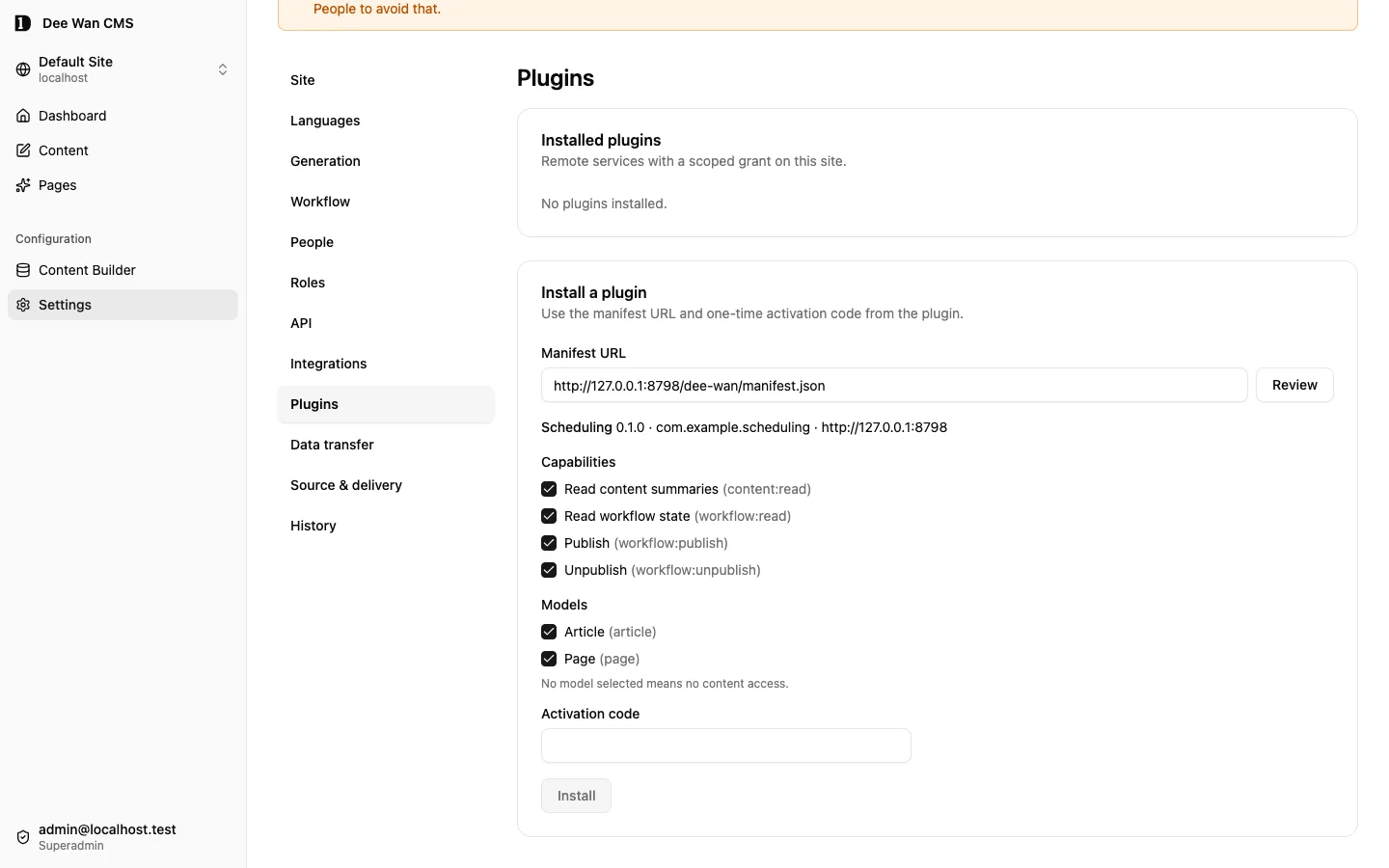
Settings → Plugins → Install:
- manifest URL
http://localhost:8788/dee-wan/manifest.json; - the activation code from step 3;
- capabilities: all four, for this walkthrough;
- models: tick
Article(or whatever the seeded site has).
Use the UI rather than curl: the administrative routes want a real session, the site header and the
site:plugins permission, and the UI has all three.
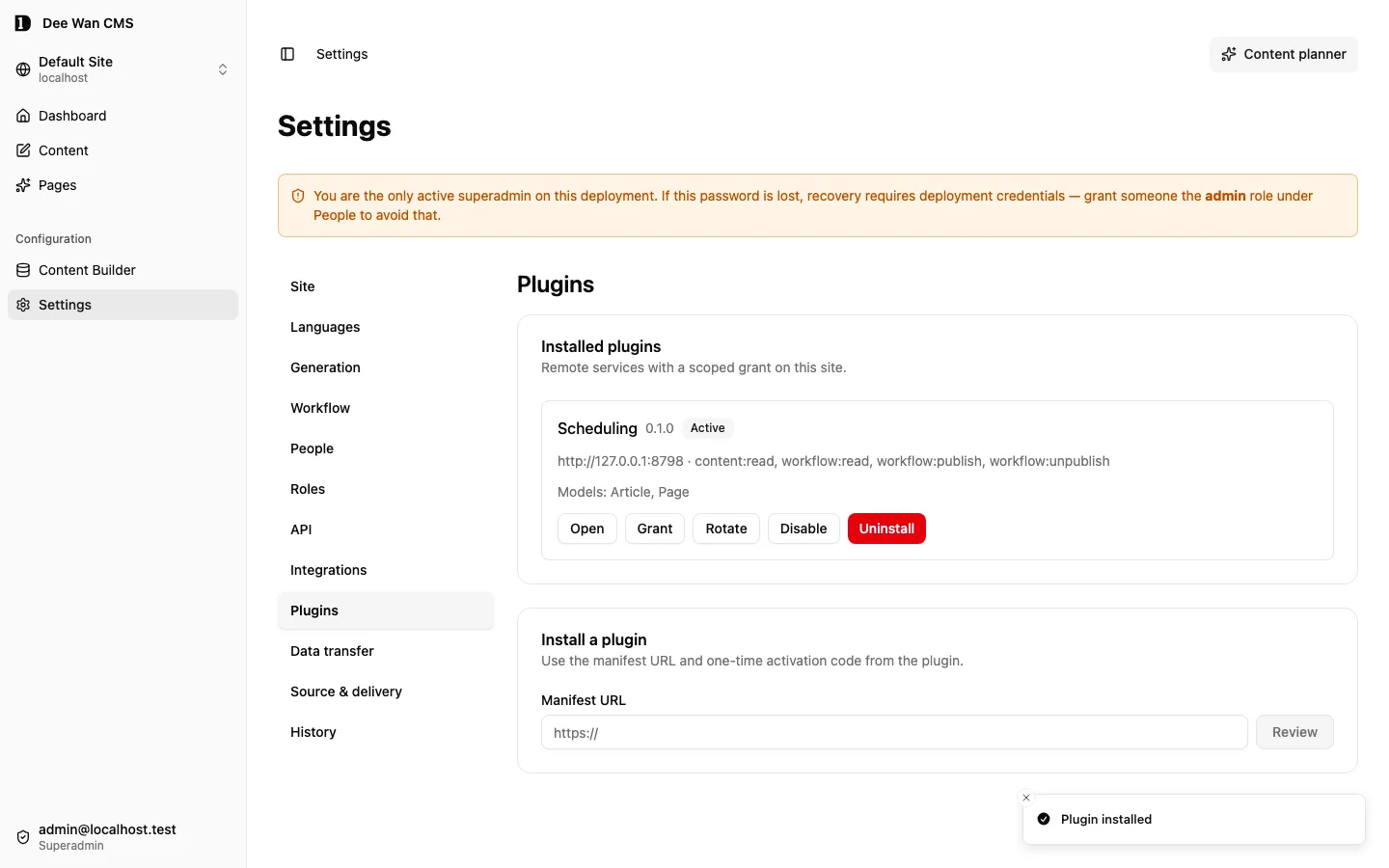
What happens, in order: Dee Wan fetches and validates the manifest, records a pending installation,
mints a token, POSTs it with your code to http://localhost:8788/dee-wan/activate, and marks the
installation active only after this plugin answers 2xx. Check both sides:
npx wrangler d1 execute dee-wan-scheduling --local \ --command "SELECT id, site_id, dee_wan_base_url FROM installation"The token_ciphertext column is what a stored token looks like. There is no column, log line or
route on either side that will show you the raw token.
5. Schedule a publish
Section titled “5. Schedule a publish”In Dee Wan: open a draft item in that model, and use the Schedule action the manifest declared.
That is a delegated launch: Dee Wan mints a one-time code, your browser lands on
http://localhost:8788/installations/<id>?dee_wan_launch=…, this plugin’s backend exchanges it for a
delegation, sets its own session cookie, and redirects to the same page without the code in the URL.
The form reads the item through the delegation, so the transitions it offers are the ones you may take right now. Pick a local time a minute or two ahead and a timezone. The confirmation shows both the local time with its zone and the resolved UTC instant — that pair is the whole point, and what gets stored.
npx wrangler d1 execute dee-wan-scheduling --local \ --command "SELECT id, kind, target_state, pinned_version_id, expected_workflow_revision, local_datetime, timezone, due_at, status FROM schedule"pinned_version_id is the exact version this will publish — not “whatever is current when it runs”.
6. Make it run
Section titled “6. Make it run”A cron trigger does not fire in wrangler dev on its own. With --test-scheduled:
curl "http://localhost:8788/__scheduled?cron=*+*+*+*+*"One tick claims up to 20 due rows with a lease, sends one command each, and settles them. Then:
npx wrangler d1 execute dee-wan-scheduling --local \ --command "SELECT id, status, attempt_count, last_code, last_message FROM schedule"npx wrangler d1 execute dee-wan-scheduling --local \ --command "SELECT schedule_id, attempt, code, http_status FROM schedule_attempt ORDER BY attempt"A completed schedule reads status = completed, last_code = transition_applied. In Dee Wan the
item is now published, its whole translation group moved together, and the content history shows
Scheduling plugin as the actor — not your user account, and not a fabricated one.
Tick again before the due time and nothing is claimed; tick twice after it and the second tick finds nothing to do. That is the lease plus the idempotency key, and it is worth seeing once.
7. Make it fail, on purpose
Section titled “7. Make it fail, on purpose”Each of these is a real state a user will hit. Do them in a scratch site.
| To see | Do this | Expect |
|---|---|---|
scheduled_target_stale |
Schedule a publish, then edit and save the draft, then tick | refused, no retry, and the item stays unpublished |
workflow_conflict |
Schedule a publish, then publish the item by hand, then tick | refused, no retry |
dependent_content |
Publish A, relate published B to it, schedule an unpublish of A, tick | refused, and Dee Wan names the dependency |
requester_unauthorized |
Schedule as a user, remove that user’s role in Dee Wan, tick | refused; authority is re-read at execution, never carried forward |
plugin_unauthorized |
Schedule, then disable or uninstall in Settings → Plugins, tick | refused; the schedule says the plugin lost access |
temporary_failure |
Stop the Dee Wan Worker, tick | retrying with a next_attempt_at; restart and tick again to complete |
retry_exhausted |
Stop Dee Wan and tick past MAX_ATTEMPTS, or past due_at + MAX_LATENESS_MS |
refused retry_exhausted, and nothing more is ever sent |
| cancellation | Cancel a pending schedule in the plugin UI | cancelled; Dee Wan is never called and nothing is reversed |
| a running schedule | Cancel while a tick is in flight | execution_in_progress, and the UI reloads the final state |
Set MAX_ATTEMPTS=2 and MAX_LATENESS_MS=60000 in .dev.vars to reach the caps in a minute rather
than a quarter of an hour.
After a retry_exhausted that followed a transport failure, the outcome is genuinely unknown —
the command may have been applied by a Dee Wan that could not answer. Check the item in Dee Wan.
That is why the schedule says so rather than claiming a failure.
8. Rotate, and uninstall
Section titled “8. Rotate, and uninstall”Rotation, which an operator should practise before they need it:
curl -X POST -H "Authorization: Bearer local-admin-secret-0123456789" \ -H 'content-type: application/json' \ --data '{"installation_id":"<installation id>"}' \ http://localhost:8788/admin/activation-codesThen Settings → Plugins → Rotate with that code. Dee Wan mints a new token, hands it here, and only then swaps its stored hash; the old token stays valid for a bounded overlap, and the first request carrying the new one ends the overlap. If this plugin refuses, the old token keeps working — check that too, by rotating with a code you have already used.
Uninstall in Dee Wan revokes the token immediately and terminally. This plugin’s data stays: any
remaining schedule refuses with plugin_unauthorized when it comes due, which is what a user should
see rather than silent disappearance. Audit attribution in Dee Wan also stays, because the workflow
event stored a snapshot of the installation.
To remove this plugin’s data for an installation, an operator asks for it:
curl -X POST -H "Authorization: Bearer local-admin-secret-0123456789" \ http://localhost:8788/admin/installations/<installation id>/delete-dataRefused with 409 execution_in_progress while a schedule of that installation is running. There is
no automatic retention purge; deletion is an act somebody performs.
9. Reset
Section titled “9. Reset”rm -rf .wrangler/state # in plugins/scheduling: the local plugin D1The Dee Wan side resets with its own local database; re-run npm run local:migrate and
npm run local:seed.
What this proves, and what it does not
Section titled “What this proves, and what it does not”It proves the two services agree: manifest, activation, launch delegation, a pinned conditional transition, the named refusals, retries, revocation and deletion.
It does not prove anything about a deployment — real DNS, real D1 latency, a real cron schedule, or
two Workers under load. Nor is it a substitute for either suite: npm test here and
npx vitest run test/plugin-*.test.ts in the Dee Wan backend are what run on every change, and both
use a double for the other side deliberately, so that a failure names one service rather than two.