Writing a plugin
A plugin is a separately deployed service. Dee Wan loads no plugin code, runs no plugin JavaScript in its admin UI, and hands a plugin no database binding — a plugin talks to Dee Wan over HTTPS and nothing else. What follows builds one end to end: manifest, install, grant, launch, a conditional publish command, and uninstall.
You need somewhere to run an HTTPS service and somewhere to keep its state. A Cloudflare Worker with
a D1 database is what the reference plugin uses (plugins/scheduling/), and this document assumes
that shape, but nothing in protocol v1 requires it.
Every request and response below is executed against the real routes by
backend/test/plugin-docs.test.ts. The ids and secrets are synthetic and deliberately invalid.
- protocol-v1.md — every route, header, body, outcome and retry rule.
- security.md — tokens, delegation, scope and the threat model.
- testing.md — the contract checklist and a local two-service setup.
- Machine-readable:
schemas/manifest-v1.schema.json,schemas/protocol-v1.schema.json.
What you are responsible for
Section titled “What you are responsible for”| You own | Dee Wan owns |
|---|---|
| Your service, its database, its clock and its retries | Content, versions, workflow rules, permissions, audit |
| Your own browser sessions and your own UI | Whether a transition is legal, and applying it atomically |
| Deciding when to ask | Deciding whether the answer is yes |
| Deleting your own data | Revoking your access |
Dee Wan never trusts a plugin’s claim that a transition is allowed, that a version is current, or that an unpublish is safe. Those are re-checked inside the mutation.
1. Serve a manifest
Section titled “1. Serve a manifest”The manifest is one HTTPS document describing your plugin and what it wants. Dee Wan fetches it once, at review, and stores the accepted snapshot; it is not re-fetched on ordinary requests.
{ "manifest_version": 1, "id": "com.example.myplugin", "name": "My Plugin", "version": "0.1.0", "protocol_versions": [1], "base_url": "https://plugin.example", "activation_url": "https://plugin.example/dee-wan/activate", "management_url": "https://plugin.example/installations/{installation_id}", "requested_capabilities": [ "content:read", "workflow:read", "workflow:publish", "workflow:unpublish" ], "content_actions": [{ "id": "schedule", "label": "Schedule" }]}Rules worth knowing before you write it, all enforced:
idis a stable reverse-domain identifier with at least three labels. It never changes across releases;versionis your release and moves freely.manifest_version,protocol_versionsandversionare three different things.- Every URL is HTTPS, carries no credentials and no fragment, and all of them — plus the manifest
URL itself — must share ONE origin. A second origin is
manifest_origin_mismatch. - Unknown top-level keys are refused. A manifest cannot rely on a field this core ignores, so you cannot ship a key today and hope it is honoured later.
- Redirects are refused on the manifest fetch and on activation. Serve both directly.
- Private, loopback, link-local and reserved destinations are refused. For local development, see testing.md.
content_actionsis at most four bounded{ id, label }pairs — no markup, no script, no CSS, no icon URL. Core renders its own button with its own styling.management_urlmay contain{installation_id}, and is navigation only. It never receives a long-lived credential in a URL.
The full schema, generated from the object core validates with, is
schemas/manifest-v1.schema.json.
2. Accept the activation hand-off
Section titled “2. Accept the activation hand-off”Installation is a two-party hand-off, so your service needs one route before anybody can install it:
activation_url. Mint a one-time activation code, hand it to the administrator out of band, and
wait. When they install, Dee Wan POSTs this to activation_url:
{ "kind": "activate", "installation_id": "plg_0000000000000000000000000000d1ee", "site_id": "cdocssite00000000000000001", "dee_wan_base_url": "https://cms.example", "protocol_version": 1, "token": "dwp_ExampleTokenNotRealExampleTokenNotRealExamp", "activation_code": "activation-code-0123456789"}What your handler must do:
- Consume the
activation_codeexactly once, and refuse an unknown, used or expired one. This is the only thing proving the caller is the administrator you gave the code to. - Check
protocol_versionis one you speak anddee_wan_base_urlis an origin you accept. - Store
tokenas your secret for this installation — encrypted at rest, never logged, never in a URL or an error body. - Answer 2xx. Core marks the installation
activeonly then, and stores only the token’s SHA-256 hash; it can never show the token again.
A kind of rotate is the same hand-off for an existing installation: replace the stored token.
Both kinds carry a code, because rotation is a hand-off and not a reset.
If your handler fails, nothing is left behind on either side: core deletes the pending installation and the administrator sees why. A retry creates no second installation.
3. Review, then install
Section titled “3. Review, then install”An administrator with site:plugins reviews the manifest first. Nothing is stored by a review — it
exists so that approval is informed.
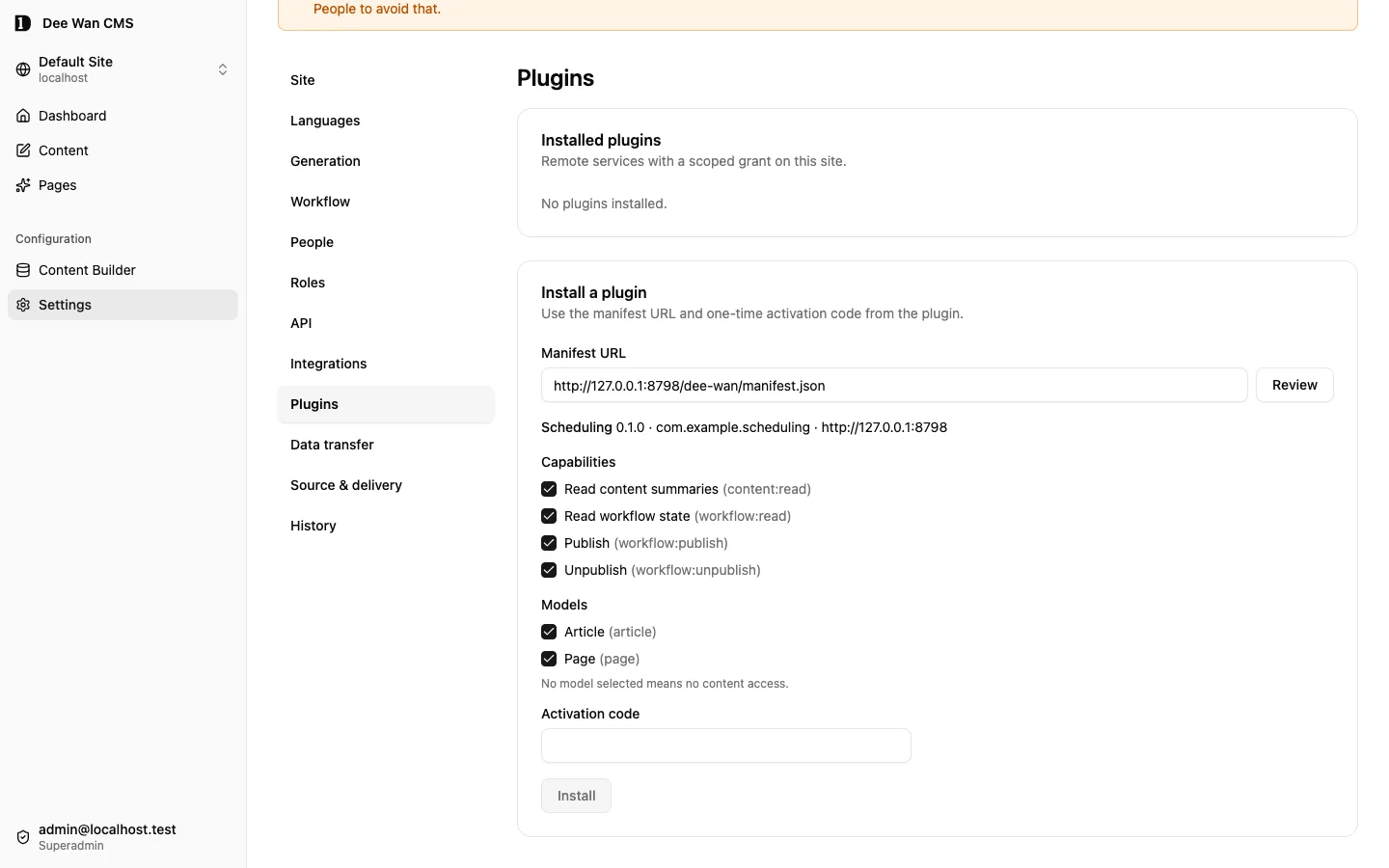
Review the manifest
curl -X POST "https://cms.example/api/plugins/review" \ -H "X-Site-Id: cdocssite00000000000000001" \ -H "Content-Type: application/json" \ -b "__Secure-better-auth.session_token=$SESSION" \ --data '{"manifest_url":"https://plugin.example/dee-wan/manifest.json"}'{ "data": { "manifest": { "manifest_version": 1, "id": "com.example.myplugin", "name": "My Plugin", "version": "0.1.0", "protocol_versions": [1], "base_url": "https://plugin.example", "activation_url": "https://plugin.example/dee-wan/activate", "management_url": "https://plugin.example/installations/{installation_id}", "requested_capabilities": [ "content:read", "workflow:read", "workflow:publish", "workflow:unpublish" ], "content_actions": [{ "id": "schedule", "label": "Schedule" }] }, "protocol_version": 1 }}Then they install: the approved capabilities, the approved model ids, and your one-time code. The
approved set must be a subset of what the manifest requested. An empty model_ids means no content
access at all — not every model.
Install, which activates
curl -X POST "https://cms.example/api/plugins" \ -H "X-Site-Id: cdocssite00000000000000001" \ -H "Content-Type: application/json" \ -b "__Secure-better-auth.session_token=$SESSION" \ --data '{"manifest_url":"https://plugin.example/dee-wan/manifest.json","activation_code":"activation-code-0123456789","capabilities":["content:read","workflow:read","workflow:publish","workflow:unpublish"],"model_ids":["cdocsmodel0000000000000001"]}'{ "data": { "id": "plg_0000000000000000000000000000d1ee", "plugin_id": "com.example.myplugin", "plugin_name": "My Plugin", "plugin_version": "0.1.0", "protocol_version": 1, "state": "active", "capabilities": [ "content:read", "workflow:read", "workflow:publish", "workflow:unpublish" ], "requested_capabilities": [ "content:read", "workflow:read", "workflow:publish", "workflow:unpublish" ], "model_ids": ["cdocsmodel0000000000000001"], "content_actions": [{ "id": "schedule", "label": "Schedule" }], "manifest_url": "https://plugin.example/dee-wan/manifest.json", "management_origin": "https://plugin.example", "created_by_email": "admin@example.com", "created_at": "2026-01-01T00:00:00.000Z", "updated_at": "2026-01-01T00:00:00.000Z" }}No token and no hash appear in that response, in any later read, or in the audit entry the install writes. Your service holds the only copy.
4. Narrow the grant
Section titled “4. Narrow the grant”A grant can be changed at any time, and only within what the stored manifest requested. Removing a capability or a model takes effect on your next request — there is no cache to wait for.
Take away a capability this plugin turned out not to need
curl -X PUT "https://cms.example/api/plugins/plg_0000000000000000000000000000d1ee/grant" \ -H "X-Site-Id: cdocssite00000000000000001" \ -H "Content-Type: application/json" \ -b "__Secure-better-auth.session_token=$SESSION" \ --data '{"capabilities":["content:read","workflow:read","workflow:publish"],"model_ids":["cdocsmodel0000000000000001"]}'{ "data": { "id": "plg_0000000000000000000000000000d1ee", "plugin_id": "com.example.myplugin", "plugin_name": "My Plugin", "plugin_version": "0.1.0", "protocol_version": 1, "state": "active", "capabilities": ["content:read", "workflow:read", "workflow:publish"], "requested_capabilities": [ "content:read", "workflow:read", "workflow:publish", "workflow:unpublish" ], "model_ids": ["cdocsmodel0000000000000001"], "content_actions": [{ "id": "schedule", "label": "Schedule" }], "manifest_url": "https://plugin.example/dee-wan/manifest.json", "management_origin": "https://plugin.example", "created_by_email": "admin@example.com", "created_at": "2026-01-01T00:00:00.000Z", "updated_at": "2026-01-01T00:00:00.000Z" }}Asking for a capability outside the stored manifest is 400 invalid_capabilities, which is why a
plugin update cannot widen an existing grant: accepting a new manifest is a separate, explicit act
(POST /api/plugins/:id/upgrade), and it intersects rather than expands.
5. Open your UI through a delegated launch
Section titled “5. Open your UI through a delegated launch”Your management UI is your own page, opened in a new top-level tab. Dee Wan does not embed it, and Dee Wan session cookies never leave Dee Wan. A launch mints a one-time code, valid for 60 seconds, stored hashed, bound to installation, site, user, action and — for a content action — one instance.
Ask for a launch URL
curl -X POST "https://cms.example/api/plugins/plg_0000000000000000000000000000d1ee/launch" \ -H "X-Site-Id: cdocssite00000000000000001" \ -H "Content-Type: application/json" \ -b "__Secure-better-auth.session_token=$SESSION" \ --data '{"action":"schedule","instance_id":"cdocsinstance00000000000001"}'{ "data": { "url": "https://plugin.example/installations/plg_0000000000000000000000000000d1ee?dee_wan_launch=dwl_ExampleLaunchCodeExampleLaunchCodeExampleLa" }}The browser navigates there. Your page must load no third-party resource before the exchange, and
the launch response carries Referrer-Policy: no-referrer so the code cannot leak through a
referrer. Your BACKEND then exchanges the code, with your installation token:
Exchange the code for a delegation
curl -X POST "https://cms.example/api/plugin/v1/launch/exchange" \ -H "Authorization: Bearer dwp_ExampleTokenNotRealExampleTokenNotRealExamp" \ -H "Content-Type: application/json" \ --data '{"code":"dwl_ExampleLaunchCodeExampleLaunchCodeExampleLa"}'{ "data": { "delegation_id": "pld_0000000000000000000000000000d1ee", "installation_id": "plg_0000000000000000000000000000d1ee", "site_id": "cdocssite00000000000000001", "action": "schedule", "instance_id": "cdocsinstance00000000000001", "user": { "id": "cdocsuser00000000000000001", "email": "admin@example.com" } }}Now create your OWN session cookie for that browser, and store delegation_id against it. The
delegation is not a credential and grants nothing by itself: it names the person who asked, and
every command you later send carries it so that core can re-read their authority at execution time.
See security.md.
6. Read content, and pin exactly what you intend to move
Section titled “6. Read content, and pin exactly what you intend to move”Before you record any intent, read the item with the delegation. The workflow block tells you
what that person may actually do now, and gives you the three values to pin.
Read one item as the person who asked
curl "https://cms.example/api/plugin/v1/content/cdocsinstance00000000000001?delegation_id=pld_0000000000000000000000000000d1ee" \ -H "Authorization: Bearer dwp_ExampleTokenNotRealExampleTokenNotRealExamp"{ "data": { "instance_id": "cdocsinstance00000000000001", "primary_instance_id": "cdocsinstance00000000000001", "translation_group_id": "cdocsgroup0000000000000001", "model_id": "cdocsmodel0000000000000001", "model_slug": "article", "lang": "en", "label": "First draft", "slug": "hello", "current_version_id": "cdocsversion00000000000001", "published_version_id": null, "workflow": { "state": "draft", "revision": 0, "transitions": [{ "to": "published", "kind": "publish" }] } }}Store, against your own record:
primary_instance_id— the instance a transition addresses. Publication applies to the whole translation group, and the primary is the group’s handle.current_version_idfor a publish, orpublished_version_idfor an unpublish. That is the pin.workflow.revision.- The
toandkindyou chose, which must be one of the offeredtransitions.
7. Send the command
Section titled “7. Send the command”One mutation, conditional on everything you pinned, with an idempotency key you can derive again.
Publish the pinned version
curl -X POST "https://cms.example/api/plugin/v1/content/cdocsinstance00000000000001/transitions/published" \ -H "Authorization: Bearer dwp_ExampleTokenNotRealExampleTokenNotRealExamp" \ -H "Content-Type: application/json" \ -H "Idempotency-Key: sched:plg_0000000000000000000000000000d1ee:sch_0001:r1" \ --data '{"kind":"publish","expected_current_version_id":"cdocsversion00000000000001","expected_workflow_revision":0,"delegation_id":"pld_0000000000000000000000000000d1ee"}'{ "outcome": { "code": "transition_applied", "message": "The transition was applied.", "retry": false }, "data": { "instance_id": "cdocsinstance00000000000001", "primary_instance_id": "cdocsinstance00000000000001", "from": "draft", "to": "published", "published": true, "published_changed": true, "published_version_id": "cdocsversion00000000000001", "revision": 1 }}Derive the key from your own record and its revision — <installation>:<record>:r<revision> is what
the reference plugin does — never from the clock. Then:
- An exact replay returns the first result as
idempotent_replay. A retry after a timeout is safe. - The same key with different input is
idempotency_key_reused. Rescheduling is a new revision, so a new key. - Every refusal is named and terminal except
rate_limitedandtemporary_failure. Read the table in protocol-v1.md and handle each one; do not turn an unknown failure into success, and do not retry forever.
The audit trail records this as the plugin acting, not as a user: the workflow event names the installation, your plugin id, name and accepted version, the protocol version, a digest of the idempotency key, and the person whose delegation authorised it. The admin UI shows your plugin’s name as the actor.
8. Uninstall
Section titled “8. Uninstall”Uninstall revokes first. The state becomes revoked, both token hashes are dropped, and that token
can never be valid again.
Uninstall
curl -X DELETE "https://cms.example/api/plugins/plg_0000000000000000000000000000d1ee" \ -H "X-Site-Id: cdocssite00000000000000001" \ -b "__Secure-better-auth.session_token=$SESSION"{ "data": { "id": "plg_0000000000000000000000000000d1ee", "state": "revoked" } }Every later request, including one already in flight in your queue
curl "https://cms.example/api/plugin/v1/context" \ -H "Authorization: Bearer dwp_ExampleTokenNotRealExampleTokenNotRealExamp"{ "outcome": { "code": "plugin_unauthorized", "message": "The installation token is missing, unknown, disabled or revoked.", "retry": false }}Two things follow, and both belong in your own documentation:
- Audit attribution survives. The workflow event stored a snapshot of your installation rather than a foreign key, so uninstall cannot erase who published what.
- Dee Wan does not claim to have deleted anything you hold. Remote deletion is your action, and your
documentation has to say what you keep, for how long, and how an operator removes it. The
reference plugin’s answer is in
plugins/scheduling/docs/end-to-end.md.
What to build next
Section titled “What to build next”Protocol v1 deliberately gives you no scheduler, no queue and no event stream. If your plugin acts later, you own:
- a lease, so two of your workers cannot execute one record at once —
Idempotency-Keyis core’s second guard, not your first; - bounded retries with jitter, an attempt cap and an age cap, and
Retry-Afterhonoured within a maximum you choose; - a terminal-failure table your users can read, because every conditional refusal means a person has to decide something;
- your own authorisation for your own UI. Core checks the launch; after that, the session is yours.
plugins/scheduling/ is a complete worked example of all four.